
Better Item Description (Русская версия)
Автоматическая локализация уже существующего аддона Better Item Description by deogo
Ссылки на оригинал мода:
https://te4.org/games/addons/tome/better_item_desc
https://steamcommunity.com/sharedfiles/filedetails/?id=954136513
Этот аддон делает описания предметов удобнее для чтения и быстрой оценки их пользы.
- все характеристики отсортированы по категориям: урон / защита / прочее
- пассивная сила предмета всегда подсвечена одинаковым синим цветом (без случайных цветов)
- активируемая сила предмета всегда жёлтая
- отображаются все категории редкости
- значение переносимого веса перенесено вправо, под название предмета
- силы "при попадании" всегда зелёные
- блок "Хар-ки" выделен оранжевым и идёт первым, как самый важный
- убраны подробные разъяснения, которые опытный игрок не хочет читать каждый раз
(например, "Закл/крит" - это сокращение от "Сила заклинаний при крит. попадании заклинанием (до 3 раз)")
- поддерживаются DLC: Embers of Rage / Ashes of Urhrok
- исправлено несколько мелких ошибок оригинала
Важно помнить:
- требования показываются только невыполненные; чтобы увидеть все - удерживайте Ctrl
- "Проб.щит" = проникновение сквозь щиты урона (Phasing), имя взято из исходников игры
- знак "-" в конце метки означает иммунитет или снижение: "Слеп-" = иммунитет к слепоте
- "Макс.сумм" = макс. число природных призывов
- "Сумм.рег.ж" = бонус восстановления здоровья (природные призывы)
- "Защ/телеп" = защита после телепортации
- "Сопр/телеп" = сопротивление всему после телепортации
- "Длит/телеп" = снижение длительности новых эффектов после телепортации
Перевод на русский язык выполнен поверх версии 1.3.3 (совместимо с русской локализацией игры).
Аддон не рекомендуется новичкам: он рассчитан на знакомых с игрой игроков.
Auto Loot Transmo - Rando
Allows the game to auto transmo loots based on item types and some more advanced options. Press Ctrl + Alt + T to config. Schematics will never be picked up. It'll either be used immediately to unlock the tinker, or be destroyed if the player has already learned it.
Also introduces some smart transmo options for characters with both a transmogrification chest and an Automated Portable Extractor.
0.0.0 - All functions have been tested separately. However considering the complexity of this addon, real-play tests are necessary.
0.0.1 - Added automatic save/load based on player name when starting a new game.
Reformat Item Description (non-intrusive)
Reformat Item Description (non-intrusive)
This extension reformats item description text so the keys in key: value lines align, improving readability.
Unlike some similar addons, this one is non-intrusive and does not modify the original description code.
Hold the Alt key while hovering over an item to view the original, unformatted description.
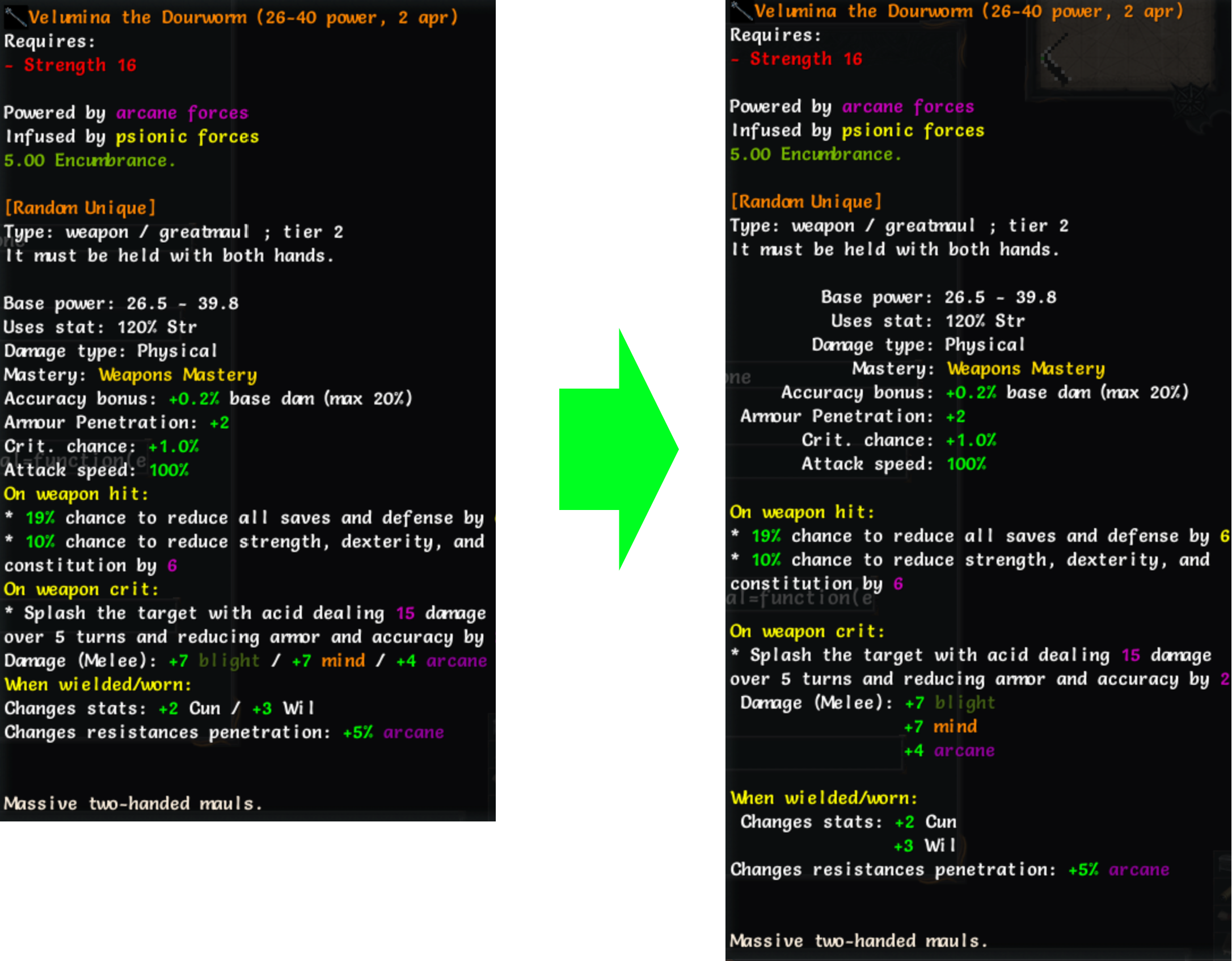
Notes
- This plugin increases the item tooltip width by 50%.
- Properties with keys longer than 25 characters are not reformatted, to prevent excessive wrapping.
Contributions, bug reports, and improvements are welcome: GitHub repository
Version history
1.0.3

- 'CTRL' and 'ALT' modifiers now work together, allowing simultaneous toggling of compare and reformatted text.
1.0.2
- Revert tooltip width to default, apply 50% width increase to item tooltips only.
1.0.1
- Remove additional empty line when description starts with section headers.
- Make 'ALT' behave like 'CTRL' when pressed and released.
1.0.0
- Initial commit of 'tome-reformat-item-description'.
Auto Loot Transmo Translated
This addon is modified from Auto Loot Transmo by helminthauge, to add support for translation and provide a simple chinese translation
CN Showing Items Tier in Inventory
This addon add a column to inventory which show items Tier and allows sorting to show higher Tier first
Useful when in late game you interested only in Tier 5 items
There is an option under "Game Setting"->UI->Sort Items by Tier by default
which is if enabled makes sorting by Tier default when opening Inventory
Otherwise click on 'T' to sort items by Tier
items which is going to be transmo- and of type scroll (rune,infusion..), tinker or other without Tier specified will be placed at the top of the inventory to avoid occasional transmo of valuables
This mod is safe to use without starting new game
original author:https://steamcommunity.com/sharedfiles/filedetails/?id=963443500
Auto Loot Transmo Copy
This addon is developed to fix some bugs for Auto Loot Transmo by helminthauge.
Auto Loot Transmo
Allows the game to auto transmo loots based on item types and some more advanced options. Press Ctrl + Alt + T to config. Schematics will never be picked up. It'll either be used immediately to unlock the tinker, or be destroyed if the player has already learned it.
Also introduces some smart transmo options for characters with both a transmogrification chest and an Automated Portable Extractor.
0.0.0 - All functions have been tested separately. However considering the complexity of this addon, real-play tests are necessary.
Better Item Description Filter
A combination of Deogo's Better Item Description and my Item Description Filter Plus (based on yutio's Item Description Filter).
Can hide undesired properties in item description. Ctrl + Shift+ Alt + F to open configuration dialog. Also able to hide some or all combat properties in game option.
For staves, all bonuses offered by Command Staff is described separately and cannot be filtered.
Laser for Everyone
Removes the name requirement to unlock the full power of Laser Powered Giant Smasher (only for the player!).
Better Weapon Automaton
This addon requires Embers of Rage DLC to be enabled.
A small tweak addon for Weapon Automaton: One Handed
This addon gives it a seperate weapon choosing interface like Cursed Sentry, and the item will be back in your hand when the automaton is destoryed.
You will not need to choose the weapon every time you cast it, nor feel afraid to lose your weapon.
Also, because it would be cool if your steam-powered campanion can use steam-powered weaponary, this addon make it support sling, steamgun and steamsaw, bringing more choices.
It also made a few changes to make it more consistent to Cursed Sentry.
